TABLE OF CONTENTS
Introduction
Sometimes your inverter may become disconnected from your WiFi network, such as when the WiFi router is updated, or if you have connected a new device that is preventing reconnection. This document runs through the procedure to re-connect your inverter to the Solarman platform. Prior to following the instructions, please read the below points:
- It is recommended that the smart device you are using has Airplane Mode off and WiFi on.
- If the inverter was previously connected, you should Factory Reset the WiFi Logger before setting a new WiFi network. This can be done by holding the Restart button on the back/underneath the WiFi dongle for approximately 10 seconds.
- The WiFi dongle is plugged into the bottom of the inverter, you may need to remove the middle cover to access this area.
Please feel free to get in contact with us if you require further assistance with these instructions.
Required Equipment
- Solarman Data Logger connected to Soltaro Inverter
Instructions
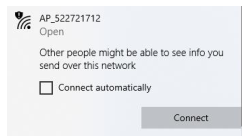
- Connect to the Access Point of the Data Logger via WiFi. This will be called AP_XXXXXXXX (Serial Number of Data Logger)
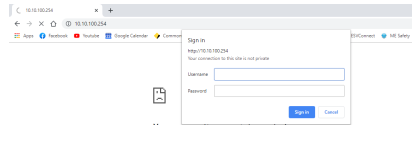
- Using a web browser, go to 10.10.100.254 and input the Username: admin and Password: admin.
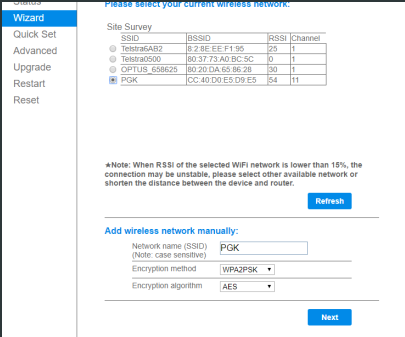
- Click on Wizard, and select the WiFi network that you want to connect it to. Select the correct encryption settings for the network you are connecting to. If you do not know the correct encryption, WPA2PSK is typically most common. Click Next
- Input the password for the WiFi network you are trying to connect to, then push Next.
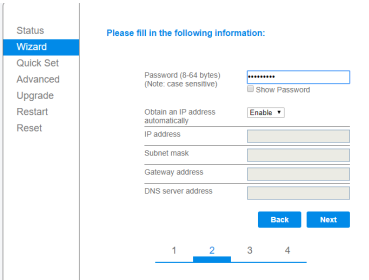
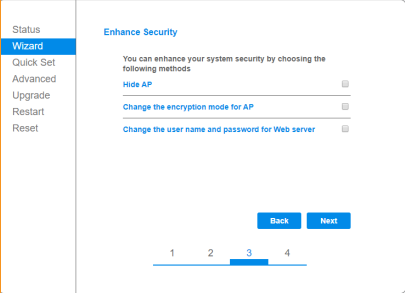
- Leave all of the options unchecked, then push Next. The WiFi logger will then restart and attempt to connect to the network that you have specified. If it is successful, then the Cloud/Net light on the WiFi logger will light up. This process can take a maximum of 5 minutes. If it has not connected within this time, it is recommended to try the process again and double check that you are using the correct password/encryption method.
Diagrams
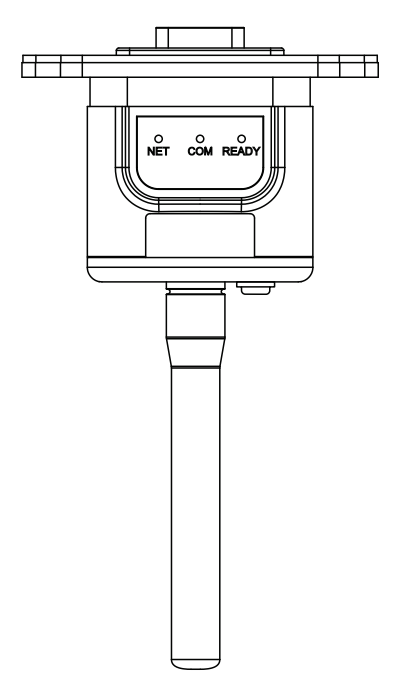
Solarman Logger
Was this article helpful?
That’s Great!
Thank you for your feedback
Sorry! We couldn't be helpful
Thank you for your feedback
Feedback sent
We appreciate your effort and will try to fix the article